
When choosing a mesh Wi-Fi system, understanding the backhaul is key, as it connects all the nodes and guarantees your devices stay seamlessly online. Backhaul can be wired, using Ethernet for faster, more reliable links, or wireless, relying on radio signals that can face interference. Proper backhaul design, like dedicated channels, helps reduce congestion and keep speeds consistent. If you want to learn more about optimizing your home network, keep exploring these essential details.

Get your next haul delivered free — and shop member deals
- Fast, free delivery on millions of items
- Access to Prime Big Deal Days deals on October 6–7
- Prime Video, Amazon Music and more included
Key Takeaways
- Backhaul connects mesh nodes, ensuring seamless internet coverage and reliable device communication throughout your home.
- Wired backhaul offers higher speed and stability, while wireless backhaul provides flexible setup but may face interference.
- Dedicated backhaul channels reduce congestion and improve overall network performance, especially in dense environments.
- System performance depends on backhaul type, frequency band, and interference levels; choosing the right setup is crucial.
- A scalable mesh system with robust backhaul design allows easy expansion without sacrificing speed or coverage.

Ever wondered how mesh Wi-Fi systems deliver seamless internet across your home? The secret lies in their backhaul, which connects the various nodes or units to create a unified network. The backhaul is the backbone that allows each device to communicate with the others efficiently, making certain your devices stay connected without interruption. Understanding how this works is vital before you invest in a mesh Wi-Fi system, especially considering factors like wireless interference and network scalability.
Mesh Wi-Fi backhaul connects nodes, ensuring seamless, reliable internet throughout your home.
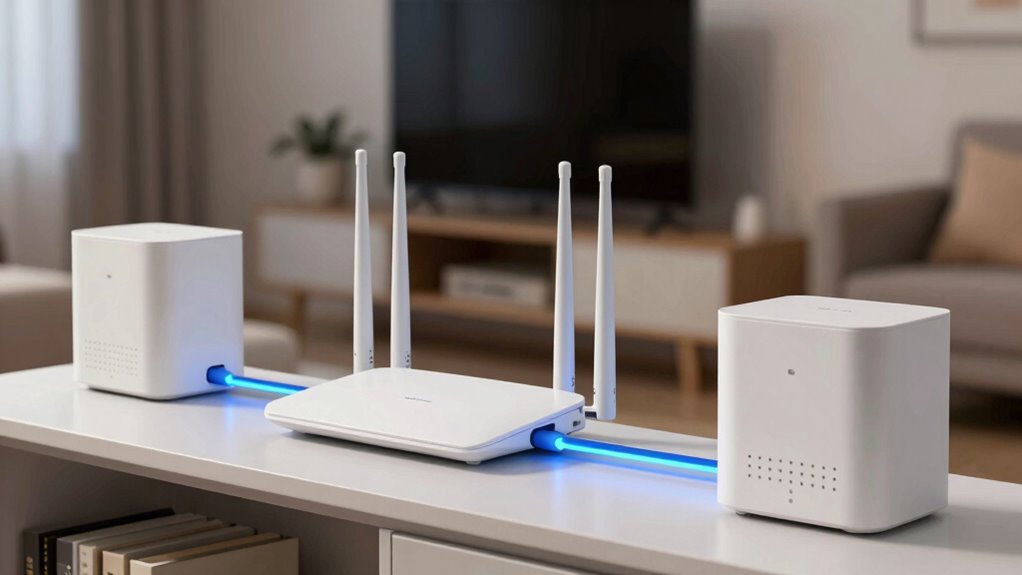
The backhaul can be either wired or wireless. Wired backhaul uses Ethernet cables to link nodes, providing a reliable and high-speed connection that minimizes network issues. Wireless backhaul, on the other hand, relies on radio signals to connect nodes, which offers flexibility and easier installation. However, wireless backhaul can be susceptible to wireless interference from other electronic devices or neighboring Wi-Fi networks, which can weaken the signal between nodes. This interference can cause slower speeds or dropped connections, especially in densely populated areas or homes with many wireless signals competing for bandwidth. Additionally, the wireless interference can be particularly problematic in environments with many competing signals, further emphasizing the importance of choosing a system with dedicated backhaul channels. Another important consideration is the frequency band used for wireless backhaul, as it can influence interference and performance.
Choosing a system with dedicated backhaul channels can help maintain stable speeds and reduce interference. When selecting a mesh Wi-Fi system, pay attention to how the backhaul is designed. Some systems automatically switch between wired and wireless backhaul, optimizing performance based on current conditions. Others use dedicated backhaul channels, which allocate specific frequency bands solely for node communication. This dedicated channel helps prevent the main Wi-Fi traffic from congesting the backhaul, reducing interference and maintaining stable speeds. It’s especially beneficial if you have many devices or require high bandwidth for activities like streaming or gaming. Knowing the wireless spectrum and how it’s utilized by your system can significantly impact overall network performance. Furthermore, understanding the bandwidth capacity of your backhaul options can help you choose a system that meets your current and future needs.
Network scalability is another fundamental aspect of mesh Wi-Fi backhaul. You want a system that can grow with your needs, allowing you to add more nodes without sacrificing performance. A robust backhaul design ensures that as you expand your network, each new node integrates smoothly, maintaining strong signals and fast speeds throughout your home. Some systems are more scalable than others, offering easy setup for additional units and minimal drop in performance as your network expands. This flexibility saves you money and effort in the long run, giving you a reliable, high-performing home Wi-Fi network that adapts to your changing needs.
mesh Wi-Fi system with wired backhaul
As an affiliate, we earn on qualifying purchases.
As an affiliate, we earn on qualifying purchases.
Frequently Asked Questions
Can Mesh Wi-Fi Backhaul Work With Any Internet Plan?
Yes, mesh Wi-Fi backhaul works with any internet plan, but your experience depends on your Internet speed and signal stability. If you have a fast plan, you’ll benefit from seamless coverage, while slower speeds might cause buffering or lag. The backhaul ensures stable communication between nodes, so it’s crucial to match your mesh system’s capabilities with your internet plan for peak performance and reliable signal stability throughout your home.
How Does Backhaul Affect Overall Network Speed?
Think of backhaul as the highway connecting your router’s cities. If it’s smooth and fast, your overall network speed improves; if traffic jams occur, speeds slow down. Bandwidth prioritization directs data efficiently, while signal interference creates roadblocks. A strong, dedicated backhaul minimizes interference, ensuring your devices get the bandwidth they need, boosting your network’s performance and keeping your online activities seamless and quick.
Is Wired Backhaul More Reliable Than Wireless?
Wired backhaul is generally more reliable than wireless because it avoids issues like wireless interference and network congestion that can slow down your connection. With a wired connection, you get a stable, consistent signal, reducing lag and improving overall network performance. Wireless backhaul can be affected by interference from other devices, so if you want a smoother, faster mesh network, wiring it up is usually the better choice.
Do All Mesh Systems Support Multi-Gigabit Backhaul?
Most mesh systems don’t support multi-gigabit backhaul, especially in consumer models. For example, a high-end setup might advertise multi-gigabit speeds, but interoperability issues and backhaul encryption limitations often restrict actual throughput. You need to check if your mesh system explicitly supports multi-gigabit backhaul and guarantees seamless mesh interoperability. Without this, your network could face bottlenecks, and security might suffer if backhaul encryption isn’t robust.
How to Troubleshoot Backhaul Connectivity Issues?
To troubleshoot backhaul connectivity issues, start by checking for firmware updates for your router system, as these often fix bugs and improve stability. Next, assess signal interference from other devices or thick walls, which can weaken the backhaul connection. Try repositioning your mesh nodes to optimize signal strength, and restart your devices to reset the connection. These steps help restore a reliable backhaul link, ensuring smoother network performance.
As an affiliate, we earn on qualifying purchases.
Conclusion
Understanding mesh Wi-Fi backhaul is like having a reliable backbone for your network. It guarantees your devices stay connected smoothly, no matter how many corners of your home you’re in. By choosing a system with a strong backhaul, you’re building a bridge that keeps your internet fast and steady, even during peak times. Don’t let weak links hold you back—think of backhaul as the sturdy spine that supports your whole connected world.
As an affiliate, we earn on qualifying purchases.
As an affiliate, we earn on qualifying purchases.
Fall Picks
fall essentials
As an affiliate, we earn on qualifying purchases.